

Description
Customize Chrome with Starlight Uniform Theme
Overview
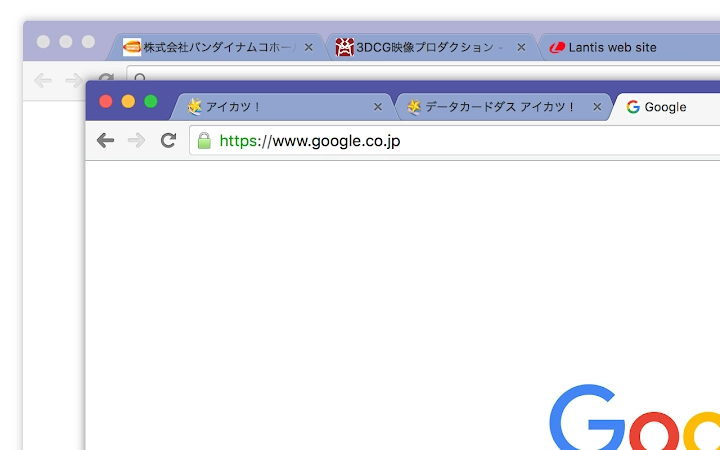
The Starlight Uniform theme is a desktop utility designed for users seeking a refined visual experience within the Google Chrome browser. Built with a focus on UI customization, it offers a dark mode aesthetic that enhances readability and reduces eye strain during extended browsing sessions. The theme is intended for individuals who prioritize a clean, minimalist interface and want to personalize their browser’s appearance without compromising performance.
Target users include professionals, students, and casual web users who spend significant time online and value a consistent, visually cohesive design across their digital workspace. The theme aligns with modern design trends, emphasizing uniformity and subtle elegance through its color palette and layout adjustments. While the developer, polamjag, did not provide additional background information, the project is hosted on GitHub, suggesting a community-driven or open-source development approach.
Real-world usage scenarios include daily web browsing, content creation, and multitasking across multiple tabs. The theme integrates directly into Chrome’s settings, allowing users to apply the design with minimal effort. Its lightweight nature ensures it does not interfere with core browser functions, making it suitable for both high-performance and standard-configured systems.
Key Features & Capabilities
- Dark Mode Interface – Transforms Chrome’s default UI into a sleek dark aesthetic, reducing screen glare and improving focus during evening or low-light usage.
- Uniform Design Language – Applies consistent styling across tabs, menus, and toolbars, promoting visual harmony and reducing interface clutter.
- Minimal Resource Usage – Designed to operate efficiently with a small footprint of 2.5 MB, ensuring no noticeable impact on browser performance.
- Platform Compatibility – Works seamlessly on both Windows and Mac operating systems, enabling consistent experience across devices.
- Easy Installation – Available via Chrome Web Store or GitHub, allowing users to apply the theme with a single click or manual installation.
Users can apply the theme to enhance their browsing environment, particularly in settings where prolonged screen time is common. For example, developers and writers may benefit from reduced eye fatigue, while designers might appreciate the clean canvas it provides for reviewing web layouts. The theme does not alter functionality—only appearance—making it ideal for users who want aesthetic control without system-level changes.
User Interface, Workflow & Performance
The user interface of the Starlight Uniform theme is entirely integrated into Chrome’s native settings, requiring no additional application window or complex configuration. Users navigate to the browser’s theme section, select the theme from the available list, and apply it instantly. The workflow is straightforward and accessible, even for non-technical users.
Navigation within the theme remains unchanged from Chrome’s default behavior, preserving familiar interactions. The visual changes are limited to color schemes and icon styling, ensuring that core usability is unaffected. The developer did not specify resource usage details, but based on the 2.5 MB file size and the nature of theme-based tools, performance impact is expected to be negligible.
Stability is maintained through Chrome’s built-in theme management system, which handles updates and compatibility with browser versions. No reports of crashes or conflicts were provided, and the theme operates as a passive enhancement rather than an active process. General software behavior patterns suggest reliable operation across standard browsing sessions.
Compatibility & System Requirements
The Starlight Uniform theme is compatible with both Windows and Mac operating systems. It is designed to function within the Google Chrome browser, which must be installed separately. The software version is 1.0.0, with a file size of 2.5 MB, indicating a lightweight deployment.
Exact system requirements were not listed by the developer. However, since the theme is applied through Chrome’s settings, it is expected to work on systems meeting the baseline requirements for Chrome itself. No specific hardware specifications were provided, and the developer did not include details on CPU or RAM usage.
Platform compatibility information is limited to the supported OSes and the need for Chrome. Users should ensure their Chrome browser is up to date to avoid potential display inconsistencies. The theme is not intended for use outside of the Chrome environment.
Pros and Cons
Pros
- Lightweight design with minimal system impact
- Enhances visual comfort with dark mode aesthetics
- Consistent, uniform UI across all Chrome components
- Easy to install and apply via Chrome settings
- Available at no cost, with no hidden fees
Cons
- No advanced customization options beyond color and layout
- Dependent on Chrome browser for functionality
- Does not support other browsers or desktop environments
- Updates require manual checks or Chrome’s automatic system
- Developer documentation is minimal
FAQ Section
Is the Starlight Uniform theme compatible with my operating system?
The theme is compatible with both Windows and Mac operating systems, provided that Google Chrome is installed and up to date.
Is the theme safe to use?
Yes, the theme is safe to use as it is a standard Chrome theme with no executable code or access to sensitive system data. It only modifies the browser’s visual appearance.
How do I update the theme?
Updates are managed through the Chrome Web Store. When a new version is available, Chrome will prompt users to update the theme automatically.
Can I use this theme on browsers other than Chrome?
No, the Starlight Uniform theme is designed exclusively for Google Chrome and will not function on other browsers such as Firefox, Edge, or Safari.
Is the theme free to download and use?
Yes, the theme is completely free to download and use. There are no premium features or subscription requirements.
Final Thoughts + CTA
The Starlight Uniform theme delivers a polished, distraction-free browsing experience through its clean dark mode design and consistent visual language. It stands out as a lightweight, secure utility for users who value aesthetics without sacrificing performance. While it lacks advanced configuration options, its simplicity is its strength, making it ideal for those seeking a quick, reliable way to enhance Chrome’s appearance.
Professionals, creatives, and everyday users alike will benefit from its visual clarity and ease of use. For anyone looking to refresh their browser interface with a modern, uniform look, this theme offers a compelling solution. With no cost and seamless integration, it represents a smart addition to any Chrome-based workflow.
Download Starlight Uniform Theme for Chrome now.
Guides & Tutorials for Starlight Uniform Theme for Chrome
How to install Starlight Uniform Theme for Chrome
- Click the Preview / Download button above.
- Once redirected, accept the terms and click Install.
- Wait for the Starlight Uniform Theme for Chrome download to finish on your device.
How to use Starlight Uniform Theme for Chrome
This software is primarily used for its core features described above. Open the app after installation to explore its capabilities.
User Reviews for Starlight Uniform Theme for Chrome 0
No reviews found





